

This guide is for a Kenmore freezer that’s still running and partly cold but can’t hold the right temperature. (No light, no hum, no cooling at all? Check the plug and the breaker, then call a technician.)
There’s a particular kind of frustration that comes with a freezer that’s almost working. The compressor hums, the light comes on, the ice cream is still there — but it’s soft. The temperature alarm keeps coming back. Something is clearly off, yet the unit isn’t dead. That’s the “too warm” scenario, and the good news is that its causes are usually less severe than a full failure. Several of them are free to fix.
The key is knowing where to look — and in what order.
What Temperature Should Your Kenmore Freezer Be? (And How to Check)
The FDA’s target for frozen food is 0°F (−18°C). At that temperature, food stays safe and keeps its quality far longer.
Don’t rely on the dial alone. The numbers on a Kenmore freezer knob (OFF, then 1 to 7) are relative settings, not degrees — Kenmore’s guides say the temperature comes preset and give no degree value for any number.
The right way to check:
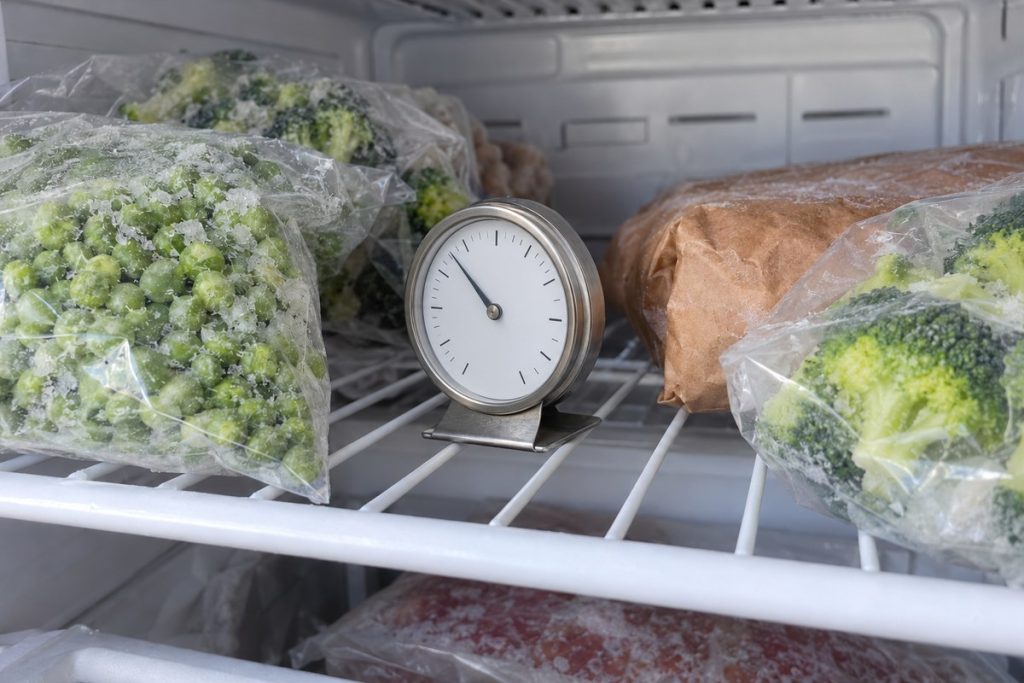
- Use a freestanding appliance thermometer — the FDA recommends one for every freezer.
- Stand it at the front of a shelf among the packages, close the door, and read it after several hours.
- Aim for 0°F. Reading clearly above it, day after day? Something needs attention.
On electronic models, the display is one sensor’s reading, not the air everywhere in the cabinet — a sensor that reads wrong can show a “normal” number while the food softens. The thermometer settles it.
Why Your Kenmore Freezer Is Too Warm — Top 10 Causes
This is a temperature-drift situation: the freezer runs, it’s cold, but it can’t reach or hold 0°F. Work through these causes in order — the first ones are the easiest to check.
1. Overpacked Freezer Blocking Airflow
Free to fix, and easy to miss. On frost-free uprights, a fan moves cold air from the cooling coil behind the back panel into the compartment. Pack food tight against the vents and the front and top run warm while the back stays cold. Kenmore’s guides add a simpler rule: don’t let packages stick out past the front of the shelves, or the door can’t close and seal. Rearranging takes ten minutes.
2. Door Opened Too Often or Not Sealing
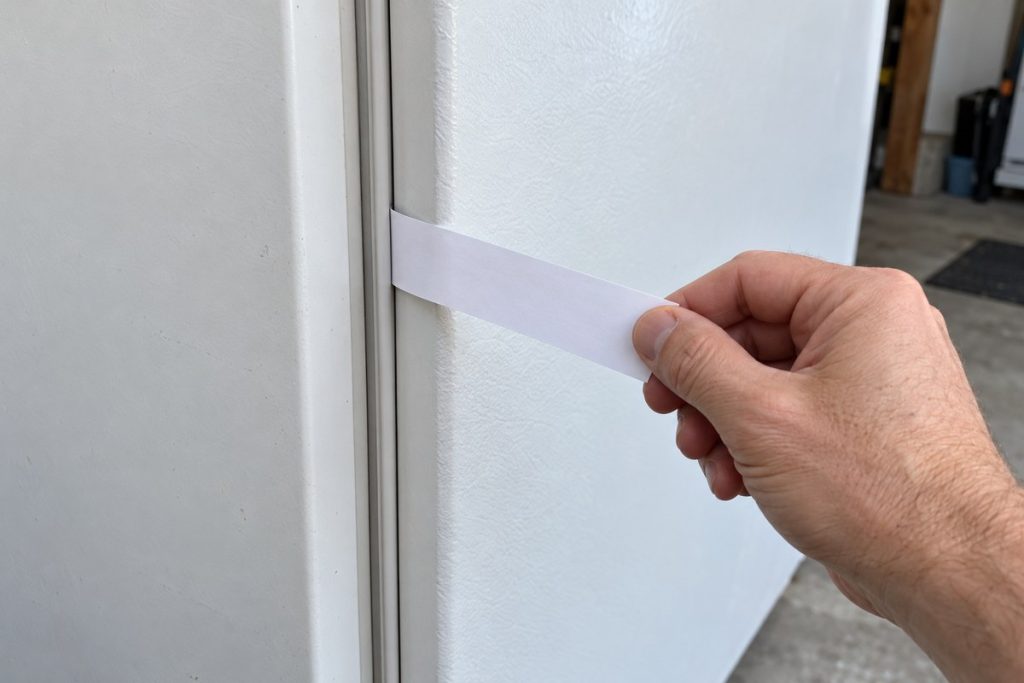
Every opening lets warm, humid air in. Kenmore’s troubleshooting chart lists a door kept open too long or opened too frequently, and a door that isn’t seating properly, among the causes of a freezer that’s too warm. Signs of a bad seal: condensation along the door frame, or frost forming unevenly near the door edges. The paper test: close the door on a strip of paper at several points; if it slides out with no resistance, the seal isn’t tight.
3. Restricted Airflow Around the Cabinet
The heat your freezer pulls out has to go somewhere. You’ll see advice to pull the unit out and vacuum the condenser coils — but Kenmore’s freezer guides give owners no such step, and the Kenmore Elite refrigerator guide says not to remove the panel covering the condenser coil area. What the guides do ask for is space: 3 inches (75 mm) on all sides of an upright, 4 inches on a chest model, away from heat-producing appliances, heating ducts and direct sun. If your own guide describes condenser cleaning, follow it exactly — or leave it to a technician.
4. Temperature Control Set Wrong
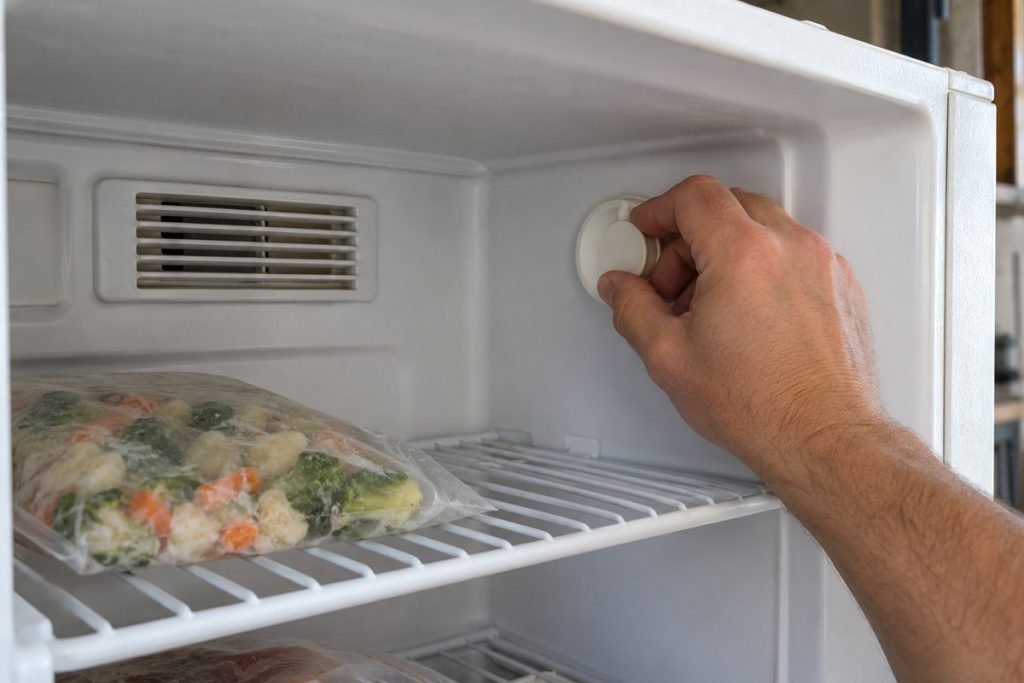
Before assuming a failed part, check the setting. Knobs get bumped. Kids turn them. On the 1–7 knob, a higher number is colder — Kenmore prints COLDEST at the top of the scale. And OFF isn’t a low setting: Kenmore says OFF stops the compressor but not the light, so a lit interior doesn’t prove the freezer is cooling. On Kenmore Elite freezers, look for the word DEMO on the panel. Kenmore says that in Demo mode the freezer will not become cold — a mode, not a broken part.
5. Defrost Problems and Frost on the Coil
A slow-building cause that catches people off guard. Frost-free Kenmore uprights melt frost off the cooling coil automatically. When a defrost part fails, frost builds up unchecked, encases the coil and chokes the airflow — the freezer gets warmer a degree or two at a time. What you’ll notice: frost spreading on the back wall of a frost-free freezer, often with water leaks during defrost. That’s a technician’s diagnosis; don’t take panels off or chip ice. On manual-defrost models, Kenmore’s guides say to defrost when 1/4 to 1/2 inch of frost has built up — and to put the drain plug back afterward, because warm air can enter through an open drain.
6. Evaporator Fan Not Running at Full Speed
A tired fan motor may still spin, just slowly: the area near the coil stays cold while the front and top drift warm. Test: with the door closed, listen for the fan. On many frost-free models it pauses while the door is open and starts again after you close it. A weaker sound than usual, or scraping, points to the fan.
7. Condenser Fan Not Running Properly
On models that have one, a condenser fan at the bottom rear pulls air over the condenser and the compressor. If it slows or stops, the compressor overheats, its protection shuts it off early, and the freezer warms. A garage freezer in an Atlanta summer is the classic case. Checking it means reaching behind a running unit — a job for a technician. One thing that’s normal: Kenmore says the exterior walls can run as much as 30°F warmer than the room.
8. Door Gasket Letting Warm Air In
A subtle gasket failure — a small crack, a twisted section, a spot that’s lost its magnetic grip — keeps a steady trickle of warm air coming in, and the compressor runs almost nonstop to compensate. Kenmore’s chart for a freezer that runs too long names a gasket that’s dirty, worn, cracked or poorly fitted: clean or change it. Clean it first — a dirty gasket can lose its seal without being damaged. Replacement is for a technician.
9. High Room Temperature
Kenmore’s freezer guides say that for the most efficient operation the freezer should sit where the surrounding temperature won’t exceed 110°F (43°C), and that 32°F (0°C) and below won’t affect operation. A July garage in Atlanta can push that limit. (The Kenmore Elite refrigerator guide is narrower: 55°F to 110°F.) That’s a placement problem, not a repair — shade, ventilation or a cooler spot fixes it.
10. Temperature Sensor Sending Wrong Data
On electronic models, a thermistor (a small temperature sensor) feeds readings to the control board. If it reads warmer than reality — or not at all — the board doesn’t call for enough cooling, and the freezer drifts warm while looking normal. A thermometer that disagrees with the display is your clue. Testing the sensor is technician work.
Still too warm after the free checks? Our team handles Kenmore freezer repair across the Atlanta area, same- or next-day most days.
How to Fix a Kenmore Freezer That’s Too Warm
Start with the free fixes, in order.
Safety first: only attempt the checks below. Don’t remove panels or covers, touch wiring, or reach into a grille or fan area — beyond these checks, it’s a technician’s job. On models with an ice maker, don’t touch the water line or its fittings; they stay under house pressure. Burning smell, smoke, or water near the outlet? Skip the checks and call.
- Check the setting. Knob off the OFF mark; panel showing a temperature, not DEMO. Turn one step colder, then allow several hours before judging — Kenmore’s guides say to allow several hours between adjustments. Don’t jump straight to the coldest setting.
- Reorganize for airflow. Move food away from the back wall and vents; nothing sticking out past the shelf fronts.
- Clean the gasket. Warm, soapy water and a soft cloth, then dry it. Run the paper test all the way around. A section that fails after cleaning needs a new gasket.
- Give it room. Air space on all sides, no heat source beside it, and on an upright, a door that closes easily when left halfway open — Kenmore’s leveling check.
- Listen to the fan. Steady whir with the door closed? Good. Silence, a weak hum or scraping — note it for the technician.
- Look for frost. Heavy frost spreading on a frost-free freezer’s back wall means the defrost system needs a technician. Manual-defrost model with 1/4 to 1/2 inch of frost? Defrost it exactly as your guide describes.
- Leave parts testing to a pro. The thermostat, sensor, fans and defrost parts are tested with the panels off and the power involved. That’s where we come in.
How to Adjust Temperature on Different Kenmore Freezer Models
- Knob-controlled uprights: the knob is inside the freezer. OFF, then 1 to 7, with 7 the coldest. Turn toward COLDEST and allow several hours between adjustments.
- Standard electronic uprights (some frost-free models): the control is inside the freezer. The UP button makes it warmer, DOWN makes it colder. Deluxe electronic models come with their own Electronics Control Guide.
- Kenmore Elite freezers: the panel is outside the unit, with up and down arrows, a °F or °C readout, and settings as low as −20°F (−29°C). DEMO on the display means the freezer won’t cool; leave Demo mode only by your guide’s steps.
- Kenmore Elite refrigerators with a freezer drawer (for example 795.71033110): the Freezer Temp button cycles from −6°F to 8°F; the guide recommends 0°F for normal ice production and says to wait 24 hours before adjusting again.
- Chest freezers: the knob is on the outside — the left or front exterior wall, depending on the guide — and runs OFF, MIN, MID, MAX. Turn toward MAX for colder.
Not sure which you have? The model number is on the serial plate — in most Kenmore guides, on the upper left wall inside an upright or the left exterior wall of a chest model.
Save Your Food — What to Do When Your Freezer Is Too Warm Right Now
If your freezer is warm right now, do this first:
- Keep the door closed. The FDA says a full freezer holds a safe temperature for about 48 hours with the door closed; Kenmore’s guides say frozen food stays frozen for at least 24 hours in a power failure if the freezer stays shut. Every peek spends that buffer.
- Check the real temperature. By the FDA’s power-outage guidance, food that still contains ice crystals or is at 40°F or below can be safely refrozen or cooked.
- Know when to let go. If you don’t know how long food sat above 40°F, the FDA’s advice is to throw it out. Don’t judge by look or smell.
- Move what matters most. Meat and fish go first — into a cooler with ice or a neighbor’s freezer.
- Take photos of the contents and the thermometer before you discard anything; some homeowner’s policies cover food loss.
- Don’t add anything warm. Kenmore’s guides say to let hot food cool to room temperature before freezing it, and to freeze no more than 3 pounds of fresh food per cubic foot at a time.
What Each Fix Involves
| Fix | Who does it | Note |
|---|---|---|
| Reorganize contents, clear vents | You | Free, ten minutes |
| Adjust the setting | You | One step, then several hours |
| Clean the gasket | You | Warm soapy water |
| Gasket replacement | Technician | When cleaning doesn’t restore the seal |
| Evaporator or condenser fan | Technician | Needs panels off |
| Defrost parts | Technician | Heavy frost on a frost-free model |
| Thermostat or sensor | Technician | Tested with the power involved |
| Sealed system | Technician | EPA 608 certified work only |
When to Call a Professional
Call us when:
- the thermometer still reads well above 0°F after the setting, door, load and room are ruled out and the waiting time has passed;
- frost keeps returning on the back wall of a frost-free model;
- the freezer runs nonstop, you hear no fan, or something scrapes;
- an electronic Kenmore flashes its temperature and beeps — one Kenmore guide lists that as “freezer temperature too high” and says to check the power and contact a service technician;
- everything simple checks out, but the freezer still can’t regulate temperature — the control, a sensor or the sealed system needs a diagnosis.
Check the warranty first. Kenmore’s limited warranty statement for freezers covers defects in material or workmanship for two years from the date of sale, with proof of sale. Older Use & Care Guides state their own terms — one year, plus five years on the sealed refrigerant system in some. Your own warranty document is the final word.
Kenmore Freezer Repair in Atlanta
PRO Appliance Repair is a family-owned, insured team with 15+ years in appliance repair.
- EPA 608 certified, background-checked technicians — experienced people at your door.
- Genuine OEM parts for your Kenmore model.
- Our warranty covers parts and labor for up to six months.
- Same- or next-day service across the Atlanta area, most days.
If a part doesn’t actually need replacing, we’ll tell you. Book a visit from our freezer repair page.
Conclusion
A Kenmore freezer running too warm usually traces back to a short list — and the most common checks are free. Start with the setting, the vents, the door seal and the space around the cabinet. On frost-free uprights, frost spreading over the back wall points to the defrost system; on electronic models, a thermometer that disagrees with the display points to a sensor or control.
A warm freezer is time-sensitive — don’t wait a week to find out what’s wrong. If the free fixes don’t hold, our Atlanta team can take it from here. Own a GE as well? The same symptom on a GE is covered in our guide to a GE freezer running too warm.
Frequently Asked Questions
1. My Kenmore freezer runs constantly but the temperature keeps rising. What’s most likely wrong?
A freezer that runs nonstop but can’t hold temperature is usually losing to heat: warm air through a leaking door seal, a hot room or too little space around the cabinet, or frost blocking the coil on a frost-free model. Kenmore’s chart for a freezer that runs too long names hot weather (normal) and a dirty, worn or cracked gasket. Check the seal and the space first; frost on the back wall needs a technician.
2. My Kenmore freezer alarm keeps going off, but it feels cold inside. What’s happening?
Cold to the touch isn’t 0°F. On deluxe electronic uprights, Kenmore says a flashing temperature with a beep every 5 seconds means “freezer temperature too high.” Check the setting, the door and the vents, read a thermometer — and if it keeps alarming, call a technician.
3. The top of my Kenmore upright is warmer than the bottom. Is that normal?
A small difference is normal. A big one usually means air isn’t circulating: food blocking the vents, a weakening fan, or frost on the coil. Clear the vents first, then listen for the fan.
4. My Kenmore freezer was fine all winter but runs warm in summer. Nothing changed. Why?
The room changed. Kenmore says the freezer works harder in hot weather — that’s normal — and its guides set 110°F as the upper limit for the space around it. In a garage or a tight corner, heat plus too little air space can push it over the edge. Give it the 3 inches all around that Kenmore asks for and keep heat sources away.
5. I turned the knob colder but the temperature didn’t change. How long should I wait?
Several hours at least — Kenmore’s guides say to allow several hours between adjustments, and a full freezer responds slowly. One step, a thermometer, then decide. Still no change after a day? The control or the cooling system needs a technician.
6. My Kenmore Elite shows 0°F on the display but the food is soft. Can the display be wrong?
Yes. The display reflects one sensor and your setting, not the air across the whole compartment — and a failing sensor can show a normal number. Put a freestanding thermometer at the front of a shelf and compare. A big gap between the two means it’s time for a technician to test the sensor and control.
Disclaimer: PRO Appliance Repair is an independent repair company and is not affiliated with or endorsed by Transform SR Brands LLC. All trademarks belong to their respective owners.