Let’s call it what it is: when your LG refrigerator is not cooling, your whole day goes sideways.
You open the door expecting that clean blast of cold air… and instead you get a sad little puff of room-temperature regret. The fridge is warm, not cold, the milk is suspicious, the leftovers are questionable, and you’re standing there thinking, “Is this a setting… or am I about to buy a new refrigerator?”
This article is a straight-talk, step-by-step guide to help you:
- figure out what’s actually happening when your LG is not cooling,
- try the safe, smart checks that work (without breaking anything),
- recognize the red flags for compressor failure, a refrigerant leak, or other sealed system issues,
- and know exactly when it’s time to stop guessing and call a pro before the problem gets worse.
We’ll keep it simple, practical, and real — and we’ll use LG’s own owner’s manuals for the French door, side-by-side, and top freezer models wherever they give an answer. You don’t have to become a refrigerator technician just to save your groceries.
If you get halfway through and think, “I’m done messing with this,” our refrigerator repair team works across metro Atlanta.
Before We Troubleshoot: Protect Your Food
Here’s the quick safety rule: if your fridge has been warm for a while, don’t gamble on “sniff tests.” When in doubt, throw it out.
Fast moves right now:
- Keep the doors closed as much as possible.
- Move essential perishables into a cooler with ice.
- If the freezer is still solid-cold, you can temporarily move some items there.
- If you have an appliance thermometer, use it — it ends the guessing game.
Now let’s find the problem.
What “LG Not Cooling” Means
When people say “it’s not cooling,” that can mean three totally different situations:
| Situation | What it usually means |
|---|---|
| Freezer is cold, but the fridge is warm | Often airflow. LG’s guides explain that cold air circulates from the freezer to the fresh food section and back through air vents. If those paths get blocked (ice, a fan issue, vents packed with food), the fridge section warms up first. |
| Both fridge and freezer are warm | Now we’re thinking bigger: Display Mode, electrical or control problems, a fan not running, or the cooling system itself (compressor / sealed system). |
| It cools sometimes… then it doesn’t | Intermittent cooling can be a control issue, a sensor issue, a defrost problem building up over time, or early sealed system symptoms. |
Bottom line: where the warmth shows up first helps narrow the cause faster.
Start Here: The 10-Minute “Don’t Overthink It” Checklist
This section is intentionally basic — because many appliance headaches start with something simple that got overlooked.
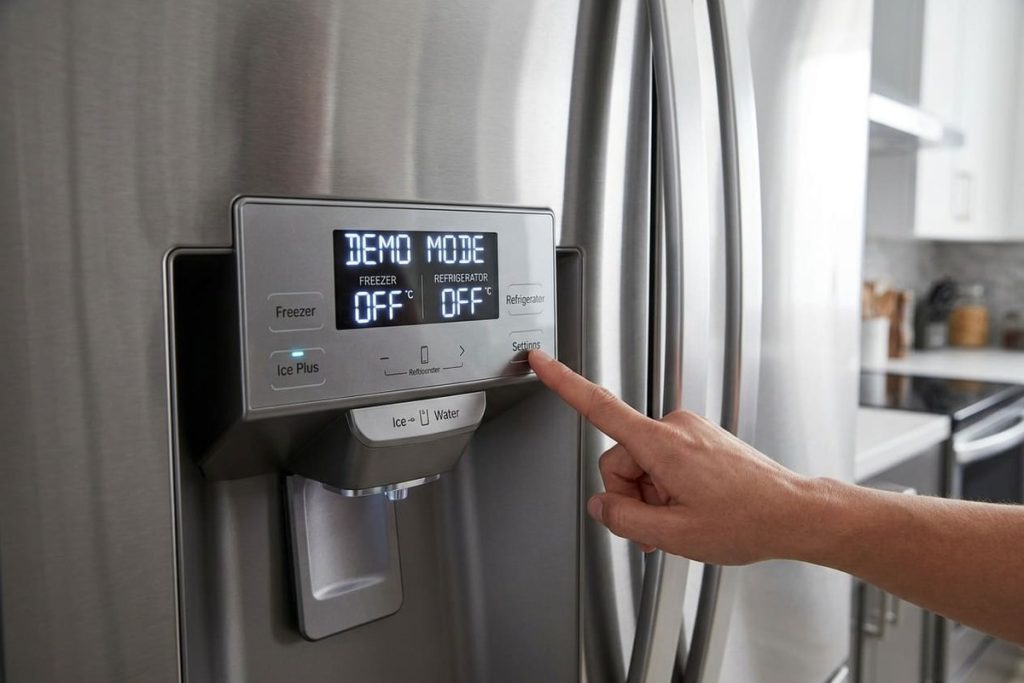
Step 1 — Confirm It’s Not in Display Mode
This one makes people feel silly, but it’s worth checking first.
LG’s French door manual answers the exact question: “My refrigerator is powered on and the controls are working, but it’s not cooling and the display shows ‘OFF.’ What is wrong?” The answer: “The refrigerator is in Display Mode. The Display Mode disables all cooling in the refrigerator and freezer sections to conserve energy while on display in a retail store.”
What you might notice:
- The fridge looks “on,” but it’s not getting cold
- The control panel shows “OFF”
- It can happen after a move, install, power event, or button presses
LG’s manual lists the button sequence to turn Display Mode off for that model. Follow your own manual exactly — the same buttons do other things when pressed differently, and the sequence varies by model.
Step 2 — Check the Temperature Settings (Then Stop Touching Them)
A common mistake is lowering temperatures every hour hoping it’ll “kick in.”
That usually backfires. LG’s French door manual gives the defaults: “The default refrigerator temperature is 37 °F” and “The default freezer temperature is 0°F.” LG’s top freezer guide adds that if the temperature is too warm, you should “adjust the control one increment at a time and wait for the temperature to stabilize.” Refrigerators don’t respond instantly — and after a new installation, “It may take up to 24 hours for each compartment to reach the desired temperature.”
Step 3 — Make Sure the Doors Are Sealing (and Actually Closing)
You’d be surprised how often the door is slightly ajar:
- a crisper drawer not seated right
- a tall bottle keeping the door from shutting
- a gasket folded, dirty, or torn
LG’s guides also note that when the doors are opened often or for long periods of time, moisture builds up inside — another sign warm air is getting in.
Step 4 — Stop Blocking the Vents (Your Fridge Needs Airflow)
If the fridge section is packed tight like a cooler on a road trip, airflow suffers. LG’s top freezer guide puts it simply: “The air vents are blocked.” Cold air circulates from the freezer to the fresh food section through vents in the wall between them, so those vents need room.
Do this:
- Find the vents
- Keep space clear around them
- Don’t stack containers directly in front of vent openings
Step 5 — Listen for Normal Fridge Sounds
LG’s manuals list sounds that are part of normal operation. One of them surprises people: “Clicking: The defrost control will click when the automatic defrost cycle begins and ends.” So a click on its own isn’t a failure.
What matters more:
- Do you hear the fan inside running when the doors are closed?
- Does the unit run for long stretches but never get cold?
- Is the unit completely silent while the cabinet warms?
LG’s top freezer guide gives a useful benchmark: at normal room temperatures (70°F), expect the compressor to run about 40 to 80 percent of the time, and more in warmer conditions. Long run time alone isn’t a failure. Long run time with a warm cabinet is.
If you’ve done these steps and it’s still warm, keep going.
LG Common Problems That Look Scary but Usually Aren’t
These feel like a disaster, but they’re often fixable without major parts.
Display Mode
If cooling is off because Display Mode is on, turning it off following your manual can solve the problem immediately.
Bad Airflow From Overpacking
Clear the vents. Give cold air a path. This alone has saved a lot of “I thought it was dead” fridges.
Dirty Door Gaskets
A gasket can look fine but still leak. Warm air sneaks in, moisture builds up, and cooling performance drops. Clean the gasket the way your LG manual describes, or have a technician check it.
A Defrost Cycle That Just Finished
LG’s top freezer guide explains: “During the defrost cycle, the temperature of each compartment may rise slightly and condensation may form on the back wall. Wait 30 minutes and confirm the proper temperature.” A short warm spell right after defrost is normal.
The Fridge Is Shoved Too Tight to the Wall
Refrigerators dump heat out of the back or bottom. If the unit can’t breathe, it can’t cool well — especially in hot summers. LG’s installation sections call for clearance around the unit; check your manual for your model’s spacing.
If your LG is still not cooling properly, the next suspect is how well the unit gets rid of heat.
Condenser Coils: Where the Heat Goes
If you have pets, carpet lint, or a busy household — this one matters.
Your refrigerator doesn’t make cold. It moves heat from inside the box to outside the box. The condenser coils are part of how it dumps that heat. When the area around them clogs with dust and hair, the system struggles, runs longer, and cools worse.
What you’ll notice:
- fridge not cold enough
- freezer weak or inconsistent
- compressor running longer than normal
- sometimes the fridge feels warm on the sides
What LG says about cleaning. LG’s newer top freezer guide says: “Use a vacuum cleaner with a brush or crevice attachment to clean the condenser cover and vents. Do not remove the panel covering the condenser coil area.” In other words, the owner’s job is the outside cover and vents — not the coils behind the panel. If the coils themselves need cleaning, add it to a service visit.
Important: don’t push a vacuum into wiring or fan blades. Gentle is the name of the game.
Why This Matters in Hot, Humid Weather
Heat + humidity + dust + pet hair = vents clog faster. And when the home is warmer, your fridge already has to work harder. A clogged condenser area pushes it over the edge.
If the Freezer Is Cold but the Fridge Is Warm: Airflow Is Your Prime Suspect
This is one of the most familiar LG complaints.
Cold air is produced at the evaporator in the freezer area and then moved through vents to cool the refrigerator section. LG’s guides describe it the same way: cold air circulates from the freezer to the fresh food section and back again through air vents.
So when the fridge is warm but the freezer is still cold-ish, look at:
- blocked vents
- evaporator fan problems
- the parts that control airflow between sections
- ice buildup choking airflow
A Quick Airflow Check You Can Do Without Tools
With the doors closed, listen for the fan inside the freezer. Then open the fridge and look at the vents: is anything pressed against them? Is there frost around them?
Don’t press the door switch or put your hand into the vents to test the fan — LG’s guides warn against putting hands near moving parts. If the vents are clear and the fridge still warms, think fan, ice blockage, or control issues, and call a technician.
Evaporator Coil Ice Buildup: The “It Was Fine… Then Slowly Got Worse” Problem
This is the classic hidden issue.
Behind the back panel of the freezer, the evaporator coil can turn into a solid ice block if the defrost system isn’t doing its job. Once that happens, air can’t pass through the coil, and the refrigerator section warms up.
Signs of evaporator coil ice buildup
- heavy frost on the freezer back wall
- fridge warms first
- freezer eventually struggles too
- you may hear the fan hitting ice
- sometimes it “temporarily improves” after the ice melts (then fails again)
Why It Happens
Usually it’s a defrost system problem:
- a heater not heating
- a sensor giving wrong readings
- a control board not starting defrost
- drainage issues creating re-freezing
The Big DIY Temptation
People unplug the fridge, leave the doors open, melt the ice, restart… and celebrate.
But if the cause isn’t fixed, the ice comes back. Then you do it again. And again. That’s not repair — that’s fridge babysitting.
A proper repair finds which defrost part failed and fixes the cause, so the evaporator doesn’t ice up again.
Fans Matter More Than Most People Realize
Your LG depends on fans to move air and to move heat away from the system.
Common fan-related issues:
- evaporator fan not running (poor cold air circulation)
- condenser fan not running (poor heat rejection and weak cooling)
- fan blades obstructed by ice or debris
- a fan motor failing intermittently
What you might hear when a fan is failing
- squealing
- scraping
- pulsing or uneven fan noise
- the fan stopping and starting randomly
If you suspect a fan issue, don’t ignore it. A cooling system that can’t move heat properly puts more stress on major components.
The “Don’t DIY This” Zone
Now we’re in the serious section — and this is where a careful diagnosis keeps a repair from turning into a replacement.
Compressor Failure (the Heart of the Cooling System)
When people search “LG not cooling,” this is usually what they fear.
A compressor can fail outright, struggle to start, or run but not actually pump effectively.
Clues that raise suspicion:
- both compartments are warm and Display Mode is off
- the unit is silent for long periods while the cabinet warms
- it runs constantly but can’t reach temperature
Here’s the key: compressor symptoms can overlap with electrical and control problems. That’s why professional diagnosis matters — test before confirming.
Refrigerant Leak (Slow Cooling Loss)
A refrigerant leak often shows up like this:
- it cools a little, but not enough
- it gets worse gradually over days or weeks
- the freezer might still make some ice, then stops
- you notice inconsistent temperatures
Leaks are not a “top-off” situation. If refrigerant is low, something is wrong in the sealed system.
Sealed System Issues
Sealed system issues include the compressor, evaporator, condenser, drier, internal restrictions, and the refrigerant charge itself.
This work requires specialized tools, procedures, and an EPA 608 certified technician. It’s not a weekend project.
Why professional repair matters here:
- it prevents contamination inside the system
- it reduces the risk of a repeat compressor failure
- it avoids buying the wrong part
- it avoids “band-aid fixes” that fail again
What About Older LG Models and Online Complaints?
Many owners start by searching their model online and reading about other people’s no-cooling stories. Online threads can’t tell you what’s wrong with the refrigerator in your kitchen.
The practical questions stay the same for any LG:
- Is your unit actually in Display Mode?
- Is airflow blocked or iced up?
- Are the fans running?
- Is the compressor starting and operating correctly?
- Are there signs of a refrigerant leak or restriction?
In other words: diagnose the refrigerator in front of you — not the internet rumor. Find your model and serial number (LG’s manuals show where the label is) and use your own manual.
A Real Troubleshooting Path
Here’s how a technician approaches an LG not-cooling call — and why it’s different from guessing.
- Confirm the complaint with real temperatures. Measure temperatures and compare them to the set points. “Feels kinda cool” is not a diagnostic method.
- Check the easy causes first: Display Mode, settings, door sealing, airflow blockage, obvious frost patterns, and condenser airflow.
- Identify whether the issue is airflow, defrost, or the sealed system. This step prevents replacing random parts.
- Explain what was found in plain English: what failed, why it caused your LG to stop cooling, what the repair involves, and what is recommended (and why).
If the fridge is worth saving, a good technician says so. If the repair doesn’t make sense, you should hear that too.
Get a clear diagnosis. Book refrigerator repair with PRO Appliance Repair. We’re family-owned and insured, with same- or next-day service on most days across metro Atlanta. Our EPA 608 certified, background-checked technicians use genuine OEM parts, and our repairs carry a warranty of up to six months.
DIY Do’s and Don’ts
Do:
- Check for Display Mode (“OFF” on the panel)
- Vacuum the condenser cover and vents as LG describes
- Clear the vents and stop overpacking
- Make sure the doors seal and close
- Use a thermometer to confirm temperatures
Don’t:
- Don’t chip ice with knives or screwdrivers (a puncture can cause a refrigerant leak)
- Don’t keep power-cycling the fridge all day
- Don’t remove the panel covering the condenser coils, or interior panels
- Don’t touch sealed system components — that’s professional territory
My LG Fridge Is Warm — What Should I Do Right Now?
If you want the shortest version:
- Protect food (cooler, minimize door openings)
- Check for Display Mode
- Confirm the temperature settings (37°F and 0°F are LG’s defaults)
- Clear the vents and check the door seal
- Vacuum the condenser cover and vents
- Look for frost buildup or ice symptoms
- If it’s still not cooling after 24 hours, call for service
Prevention: How to Avoid Another Not-Cooling Week
You don’t need a maintenance plan. You need a few habits:
- Regularly: vacuum the condenser cover and vents (more often with pets)
- Regularly: check that the door gaskets are clean and sealing
- Always: keep the vents clear inside the fridge
- After power outages: confirm cooling resumed and temperatures are safe within a reasonable window
This is the boring stuff that prevents big surprises.
When to Call a Technician
Call if:
- your LG is not cooling after the basic checks and 24 hours
- you see heavy frost buildup or suspect evaporator coil ice
- both sections are warming
- the unit is silent for long periods or runs nonstop without cooling
- you suspect a refrigerant leak or other sealed system issues
Conclusion
When your LG refrigerator is not cooling, the fastest way to avoid wasted groceries is to troubleshoot in a smart order: start with the simple stuff (Display Mode, settings, door seals, airflow and vents), then check the condenser cover and vents, and watch for the bigger patterns like evaporator coil ice buildup, fan problems, or inconsistent cooling.
If your freezer is cold but the fridge is warm, airflow or defrost issues are often the culprit. If both the fridge and freezer are warm, or temperatures keep getting worse, that’s the “stop guessing” moment — because the wrong DIY move can turn a repair into a replacement. For the freezer side, see our guide to an LG freezer not freezing.
FAQ
Why is my LG refrigerator not cooling but the lights are on?
Because “power on” doesn’t always mean “cooling on.” LG’s manual says that if the controls work, nothing cools, and the display shows “OFF,” the refrigerator is in Display Mode, which disables all cooling. Airflow issues, fan failure, defrost failure, or sealed system trouble can also cause it.
Why is my LG fridge warm but the freezer is still cold?
Often airflow. LG’s guides explain that cold air circulates from the freezer to the fresh food section through air vents, so blocked vents, a fan problem, or evaporator ice buildup can warm the fridge first.
Is clicking a sign my LG compressor is failing?
Not by itself. LG’s manuals say the defrost control clicks when the automatic defrost cycle begins and ends. Worry more about a warm cabinet with long silences, or nonstop running without cooling.
How long should my LG run, and how long does it take to get cold?
LG’s top freezer guide says to expect the compressor to run about 40 to 80 percent of the time at normal room temperature, and more in warmer conditions. After installation, it may take up to 24 hours for each compartment to reach the set temperature.
Can I clean the condenser coils myself?
LG’s newer top freezer guide says to vacuum the condenser cover and vents with a brush or crevice attachment and not to remove the panel covering the condenser coil area. Clean the outside; leave the coils behind the panel to a technician.
What are sealed system issues?
Problems inside the refrigeration loop — the compressor, refrigerant charge, restrictions, leaks, or heat-exchange parts. This is professional territory for an EPA 608 certified technician.
PRO Appliance Repair is an independent repair company and is not affiliated with, sponsored by, or endorsed by LG Electronics. Brand and model names are used only to identify the appliances this page is about and remain the trademarks of their respective owners.